
 Deutsch
 Français
 Español
 Português
 Italiano
 Русский
 Türkçe
 日本語
日本語 한국어
한국어 简体中文
简体中文 Polski
 ไทย
ไทย Tiếng Việt
 Bahasa Indonesia
EASYNODE FOR BTX · BY EASYBTX
easyNode for BTX.
Run a node. Support the network.
Every full node makes BTX harder to censor and easier to trust. easyNode turns "run a node" from an evening of terminal commands into one click, then sits quietly in your menu bar, doing its part.
Mac (Apple Silicon) · Windows (x64; to have an NVIDIA card check blocks, run it under WSL2) · Linux (x86_64, deb too) · checksums (mac, Windows, Linux) · what's new. No mining, no account, wallet off by default.
Where things stand, 14 October 2026
The 23 September split, said plainly. At 00:13 UTC on
23 September the network split at block 227,313. The valid chain is
the one whose block 227,313 is d5f0e92f…. The longer
branch, which starts from b28c3e84… and which btxscan.io,
luckypool.io and the signed-confirmation mirrors followed on the 23rd,
fails BTX's block check on both the processor and the graphics chip,
according to BTX's developers, and their next release will refuse it.
Our node census agrees in the way it can: that evening every reachable
node on BTX 0.34.9 that checks blocks itself was on the valid chain,
and none was on the longer one. An earlier version of this page had
that the other way round.
What easyNode does about it. The older 0.34.5 and 0.34.6 engines set a disputed block aside and wait for a second graphics chip to settle it, which a machine with one does not have. 0.6.28 moved to BTX's 0.34.9, which checks such a block again on the processor and decides it, so an updated node that checks blocks stays on the valid chain. 0.6.29, released 24 September, goes further: every node refuses the first block of the longer branch outright, as BTX's developers asked every operator to, including the nodes that follow signatures instead of checking blocks. 0.6.30, released 25 September, lets those nodes move again: they now trust the one key that signs the valid chain and dial a node that holds its signatures. 0.6.32, released 28 September, starts a new node of that kind from a snapshot that key signed, much closer to the tip. It also holds every node off two later branches until BTX's developers rule on them: the one that left the valid chain at 228,145, and the dead one from 229,400 where this project's signer stopped. That is a decision, not a verdict, and a later update lifts it if the ruling goes the other way. What held the valid chain back late on the 23rd was not the engine: every reachable node on it stood at 227,374, because its newer blocks had been mined on machines no one could download them from. By the morning of the 24th it was moving again. Until confirmations are real again, do not send or accept BTX. Anything before block 227,313 is on both branches and is safe.
The 5 September split, for the record. On 5 September the network split at block 210,496 and our validator sat on the minority branch for twenty hours; it rejoined the live chain at 20:32 UTC after a 383-block reorganisation. The node engine's own peer rules kept it from the live chain's nodes, and we have reported that upstream. easyNode now shows when a longer chain exists that your node cannot obtain and follows the chain with the most work instead of parking. It also started dialling seeds measured on the live chain then, and after 23 September the peers it dials first answered on the valid chain. Which chain any reachable node follows is measured on the node census.
Mac. easyNode 0.7.12 is the current Mac build, released 12 October, built on a Mac from the same commit as that release's Linux and Windows builds. 0.7.13, which gets a graphics card lost mid-run back by itself, and 0.7.14 and 0.7.15, which harden that, are out for Linux and Windows; the Mac build follows once it is made on a Mac. 0.7.12 refuses the invalid branch of the 23 September split outright, as 0.6.29 did, and it carries BTX's tagged 0.34.15 engine, up from 0.34.12, built by us from the BTX source, the same engine commit as the Linux and Windows builds. Since 0.6.28 it also pins a signing node's own key, because 0.34.9 refuses to start a node that holds a signing key and pins none; without that, the update would have stopped every Mac with signing switched on. Until the Mac build of 0.7.15 is out, a Mac on 0.7.11 or older is offered nothing: the update feed names one version, and that version has no Mac build yet. Download 0.7.12 from this page by hand. A Mac below 0.7.8 still runs the 0.34.12 engine described further down, so please do. It keeps what 0.6.27 brought, a line saying when every recent block reached a node on a single key, and before that the peering work described above, the corrected fork warning, the config lock, the role the node actually fills, and a log of every self-update check. The build before 0.6.17, 0.6.12, stopped at block 199,299 and could not start again on its own: BTX published a change to a difficulty rule at that height on 25 August and withdrew it two days later, and 0.6.12 still carried the withdrawn rule. Updating is what starts such a Mac again.
Your coins are not affected. A node reads the chain, it does not hold your keys. What is out of date is your node's view of the chain, not your balance.
What a Mac does on this network, said plainly. The engine counts every M1, M2, M3 and M4 chip as one verified class: such a Mac checks the block maths on its own GPU and validates as a full consensus node once it passes a self-check at startup, which our M2 Pro does. An M5 is not yet on the engine's list of verified chips, so it starts as a trusted mirror instead: it follows the chain the network's validators have signed and does not check the maths itself. Checking is not the same as keeping up. On an M2 Pro one block's check takes 80 to 125 seconds, and in the app it connected 0.45 blocks a minute, on 0.34.9 and on 0.34.6 alike. That is less than the chain produces, so a Mac of that class that checks blocks falls behind. From 0.6.32 the app measures that: when a Mac cannot keep up it says so, with both numbers, and offers to follow signatures instead. Which Macs are fast enough we have not measured yet. A Mac that follows signatures, like an M5, follows whichever chain its pinned signers sign, and the mirrors the census reached on the 23rd were on the longer branch. From 0.6.29 such a Mac refuses that branch. From 0.6.30 it also trusts the one key that signs the valid chain and dials a node that holds its signatures, so it moves again instead of waiting at block 227,312: a reference node of that kind went from 219,000 to the tip in 34 minutes.
Updating a Mac that has been stopped for a week is not instant. From 0.7.0, a new install starts from the newest chain snapshot that at least two of this project's operators have signed, close to the tip rather than the small verified snapshot at block 219,000 used before. If no such snapshot exists yet, or the operators disagree about one, it falls back to the snapshot this release pins, at block 225,927. A node that already loaded an older snapshot keeps it and downloads nothing. Either way it then checks its way up to the tip and backfills the history behind it, and how long that takes depends on which peers serve it blocks as well as on the Mac. Expect hours rather than minutes on a fast machine: our own Mac was catching up at roughly two blocks a minute on 6 September. A Mac as slow as the M2 Pro above does not catch up. Leave it running, and keep the wallet closed while it catches up: reading a balance mid catch up slows validation down. The app says where it is on the status screen the whole time, and from 0.6.32 how long it has left at its own measured pace.
Linux. easyNode 0.7.15 for Linux is live: released
14 October, and installed AppImage copies from 0.6.0 onward update
themselves through the app's own check. Since 0.7.13 it gets a graphics card
back by itself when the node lost it mid-run, typically to a driver
update: it restarts the node, or inside WSL on Windows it restarts
WSL, which is what brings the card back there. Restarting WSL stops
every Linux program running on that PC, an easyBTX miner under WSL
included, so it is a switch in Settings, on by default and shown only
inside WSL. 0.7.14 restarts WSL only for easyNode's own node, at most
twice for one loss of the card, and starts the node again if WSL did
not restart. 0.7.15 does all this even when easyNode itself was
restarted after the card was lost. 0.6.26 was the signer release:
a machine with a card the engine accepts now signs a confirmation for
every block it checks, so the explorer and the wallets behind it can
follow your node instead of one home computer, and it offers its
public key to us so whoever runs a mirror can decide whether to trust
it. The private key never leaves your machine and both the signing and
the offer are switches in Settings. Since 0.6.22 it tells you when
its own newest block is more than two hours old, a signal that a stuck
set of peers cannot fake, and it stops describing a node that holds a
signing key as an archive serving history. 0.6.23 moves the engine to
BTX's tagged 0.34.6, shows which role your node fills and whether that
helps other nodes, and writes every self-update check to a log. From
0.7.0 a .deb install updates itself too, after one
password prompt; a .deb copy older than 0.7.0 is told
about the new version and updated by hand. Its engine is BTX 0.34.15,
up from 0.34.12, built by us from the BTX source because the BTX Linux
binaries need a newer glibc than Ubuntu LTS carries, and built without
BTX's new model network, so it starts no model helper and opens no
extra port. It tells you in
amber when a longer chain exists that it cannot obtain, and it follows
the chain with the most work. 0.6.20 added a switch worth turning on:
your node can answer one question for wallets, which block sits at a
given height. That is how a wallet checks it is on the right chain, it
costs almost nothing, and it works on a node of any size, because it
reads the list of blocks rather than the blocks themselves. It answers
that and refuses every other question. With a suitable NVIDIA card (verified here on an RTX 3060, most recently with the 0.34.15 engine on 13 October 2026)
the node proves itself at startup and validates blocks as a full
consensus validator. Without one, since 0.6.23, the node runs as a
trusted mirror: it follows the chain the network's validators have
signed and serves history to other nodes, which is what the explorer
is shortest of, but it does not check the block maths itself and it
trusts the pinned signing keys to have done so. Earlier builds on such
a machine started, synced headers, and stalled. The download is large,
about 469 MB, because the engine and its GPU math library travel
inside the app.
Why the engine moved to 0.34.6, said plainly. The previous
engine, v0.34.5, could not keep up on our Linux hardware: measured on
one machine with the same data and only the binary changed, it
connected 0.68 blocks a minute against a chain producing 0.95, so a
node on it fell behind for good while reporting itself healthy. The
0.34.6 engine did 3.80 on the same machine and has run on our own
validator since 2 September. 0.6.18 through 0.6.22 bundled their
release/0.34.6 branch at commit 9eb4e005.
BTX tagged 0.34.6 on 13 September at 3013c2c2, one commit
past that build: the commit stops counting a peer that only sent
headers as a source of block bodies and changes no consensus rule.
0.6.23 moves to that tagged commit, built from a pristine tree by our
own CI, and both of our engine checks verify that exact commit. The
engine lands on its own with the app update: the install directory
carries the commit, so no copy can keep the old build by mistake. An
AppImage applies it on its own; a .deb install is told
and updated by hand. The Windows build carries the same engine commit,
built separately on its own platform, and so does the Mac build, from
the same commit. The blocks a minute above were
measured on Linux hardware and we have not repeated that measurement
elsewhere.
Windows. There is a native Windows build again:
0.7.15. 0.6.21 was the first since 0.6.6, and
0.7.15 carries BTX's tagged 0.34.15 engine, the one 0.7.8 brought, up from 0.34.12, the same
commit Linux carries, but cross-compiled without any GPU code, so a native Windows
node never checks blocks or signs them itself. Upstream still publishes no Windows
binaries at all, so we cross-compile that engine ourselves and smoke it
on a real Windows machine before it ships. Copies on 0.6.6 are offered
this one directly — they have always used the working feed — and that
matters, because 0.6.6's engine predates the 17 August consensus
release and parks at block 191,713, or at 184,999 on a machine that
checks blocks on the processor. If you have a Windows node sitting at
one of those heights, this is what starts it again.
The WSL2 route is still there and still good: the Linux build under
WSL2, the same way the easyBTX miner has run on Windows since July.
That is the setup we verified 0.6.17 on — a Windows machine, WSL2, and
an RTX 3060, where the node qualifies its own GPU and validates as a
full consensus validator. The
five minute setup is in the guide.
Which you pick depends on your card. The native build runs as a
trusted mirror and follows the signed chain, and from 0.6.29 that is
true with an NVIDIA card too: before, it started such a PC in the mode
meant for checking blocks, which its engine cannot do, and going by
the code it stalled there. To have a Windows PC check blocks with its
card, use WSL2: it runs the Linux engine, which has the GPU kernels,
and it is the route we have measured against a GPU.
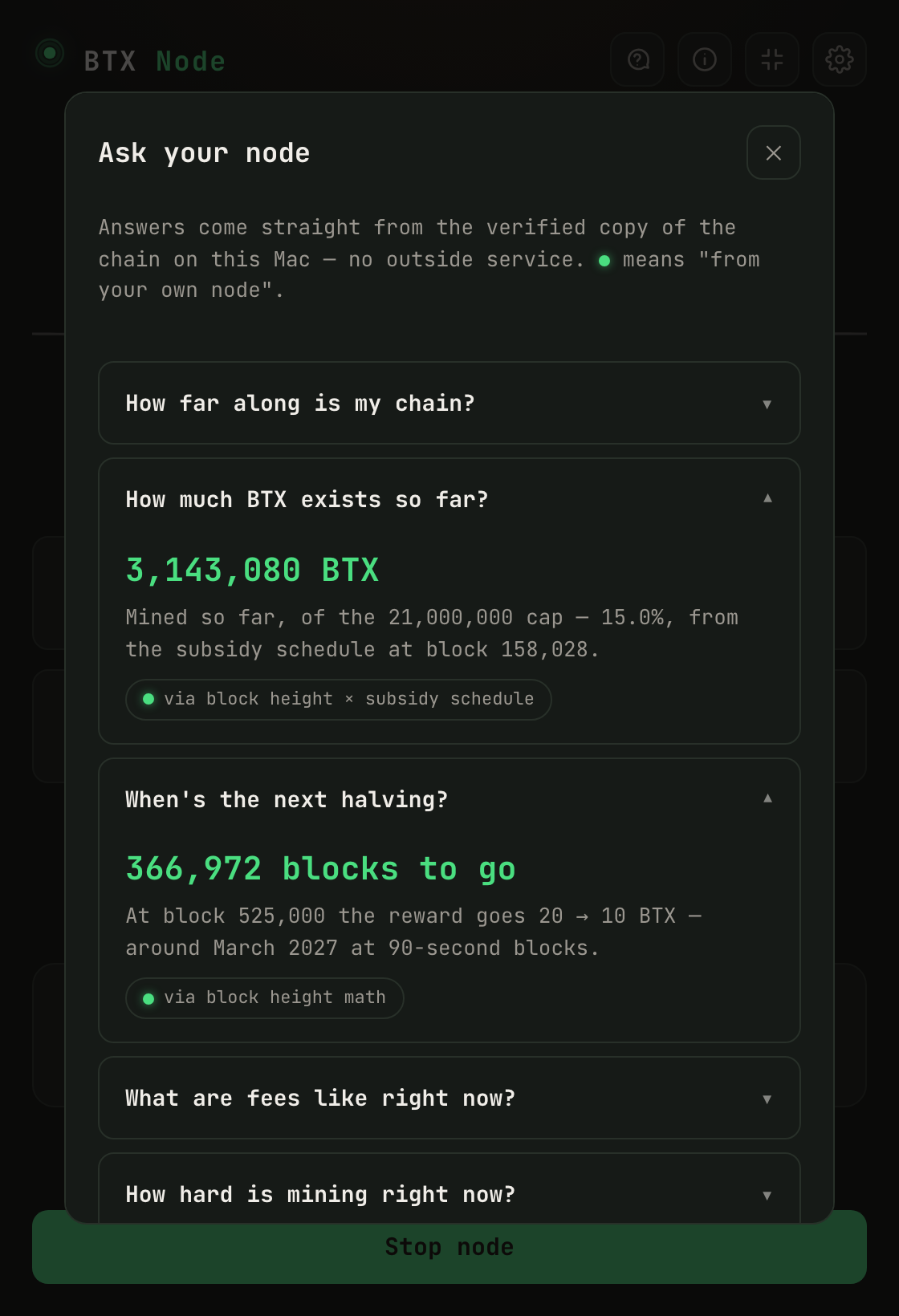
Ask your node about the chain and get cited answers from your own verified copy. The green dot means it came from your machine, not a website.
How to set it up, in 5 steps → What changed in each version →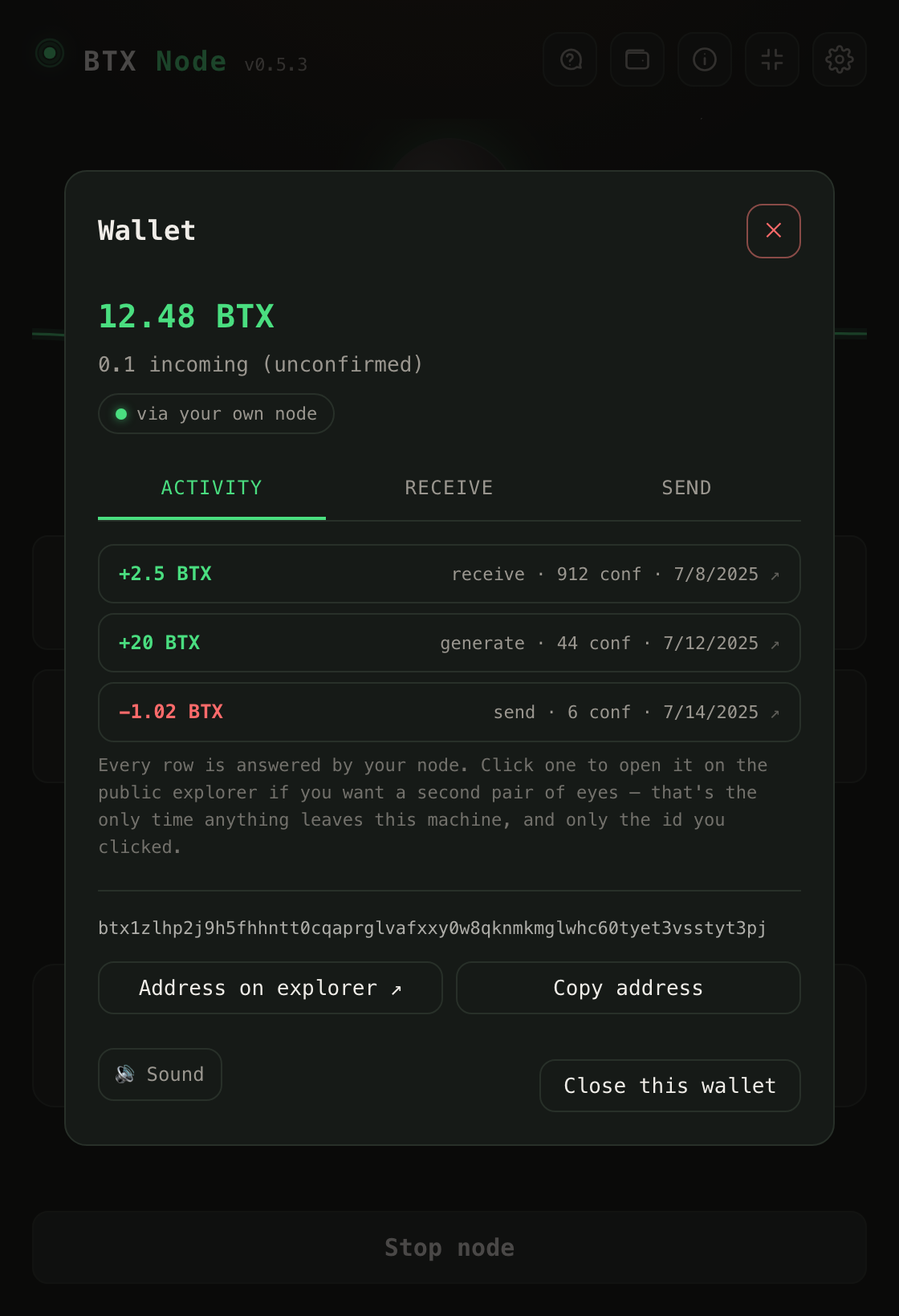
An optional wallet, off by default
Turn it on in Settings, then create a post-quantum BTX wallet or import your .btxwallet file. Send and receive BTX, watch confirmations arrive live, and hear a quiet coin when a payment lands. Balances and history are answered by your own node, never a public explorer, and nothing leaves your computer except a transaction you choose to broadcast.
Why run a node?
Decentralization is people
A chain is only as independent as the number of people who verify it themselves. Your node checks every block against the rules on your own machine, not against anyone's server. BTX also requires one proof that needs a suitable GPU; a machine that can run it does, and a machine that cannot uses signed confirmations from operators who did. Your node tells you which one it is doing.
BTX is young
The network is small and growing. Right now, each additional node meaningfully strengthens it. This is the moment where one person still moves the needle.
Quietly useful
Your node relays blocks and transactions to other peers, helps new nodes bootstrap, and keeps an independent copy of the chain's history alive.
How it works
- 1
One click to set up
The app downloads a checksum-verified snapshot of the blockchain and starts a full node. Ready the same evening, not next week. The full history backfills in the background.
- 2
It looks after itself
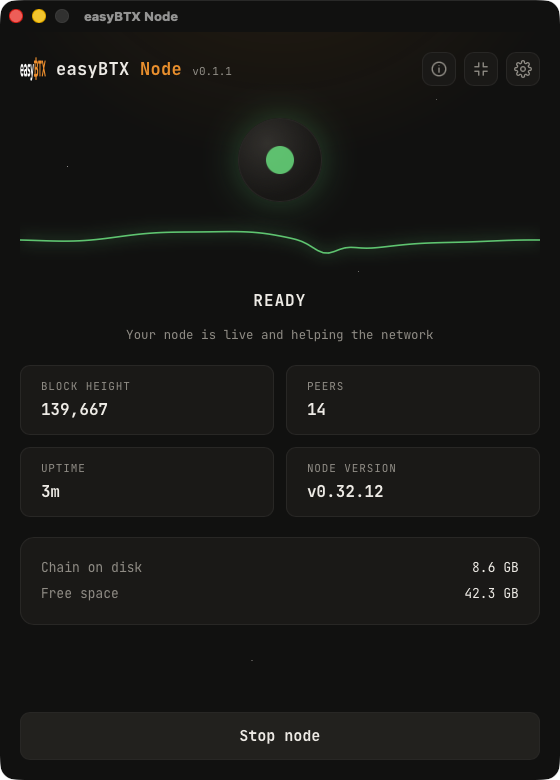
Close the window and it asks whether to keep the node running in your menu bar or quit. It can keep your computer awake, start at login, keep itself up to date, and shows a calm live status: block height, peers, uptime, disk.
- 3
Stop anytime
One click stops the node cleanly. Your disk space is yours. The app shows exactly what the chain uses and can reclaim data the node no longer needs.
Where your node's data comes from
Your node checks every block it receives before it keeps it: by redoing the work on a machine that can, or against signed confirmations on one that cannot. Where a block came from does not change that check.
When it starts, it dials the peers below first, in this order. They are written into the app, and you can read the same list in its source. After that your node also connects to other nodes it hears about, so most of the peers it talks to over time are ones nobody here picked.
Dialled first, for blocks
-
109.199.124.187:19335A BTX mining pool's node, offered by its operator and checked here on 4 September 2026. Recent blocks only (it is pruned) and signed confirmations. It checks blocks itself. -
134.199.150.193:19335archive.btxbyronbay.com, a full archive offered by its operator Jarek and checked here on 10 October 2026. The whole chain: every block, old and new. It follows signatures rather than checking blocks itself.
Dialled next, the archives
-
20.86.181.203:19338The node behind btxscan.io, this project's explorer. Signed confirmations. It follows signatures rather than checking blocks itself. -
20.86.181.203:19335The second node behind btxscan.io, on the same machine as the one above, checked here on 10 October 2026. The whole chain and signed confirmations. It follows signatures rather than checking blocks itself.
Asked only for addresses
-
node.btx.dev:19335A BTX network introducer. Addresses of other nodes. No blocks. -
node.btxchain.org:19335A BTX network introducer. Addresses of other nodes. No blocks. -
node.btx.tools:19335A BTX network introducer. Addresses of other nodes. No blocks.
A new node does not start from block zero. It starts from a confirmed snapshot of the chain that at least two of this project's operators have signed, and the app checks that snapshot again itself before loading it. Where things stand above explains how that snapshot is chosen, and what a node does when there is no confirmed one yet.
Send, receive, and how updates reach you
The optional wallet sends and receives BTX straight from your node. Watch confirmations tick up live, and hear a quiet coin when a payment lands or clears. A running node reads LIVE at a glance, money in shows green and money out shows red, and closing the window asks whether to keep the node in your menu bar or quit.
The app updates itself on Linux and Windows, and a Windows machine running it under WSL2 updates like Linux. A copy checks for a new version, verifies its signature, and installs it on the next relaunch. Any platform not named there checks the same place, finds nothing listed for it, and stays on the version you installed. That is safe, but it is not always that platform's newest build: a copy older than the last build its platform got waits for the next release that carries its platform, or for you to download that build by hand from this page.
On Linux, a .deb install updates too, from 0.7.0
on. It asks for your password once, the way installing any
system package does. A .deb copy older than 0.7.0 is told
about the new version, and you install it by hand one last time with
the command on this page. On a machine with no desktop to show the
prompt, a .deb copy tries once, then shows the command to
install it by hand. The AppImage updates itself without asking.
Still one calm app on macOS, Windows, and Linux. Each platform's node is built from the official BTX source and boot-tested before it is allowed into the installer, including mining a test block.
Following the chain across the 2026 consensus changes
BTX changed how blocks are proven at height 185,000 on 10 August 2026, and added a difficulty floor at height 191,714 on 17 August. Both changes are done and the network moved on. A node whose engine was built before one of those lines reads everything past it as invalid, so it parks one block below and keeps looking perfectly healthy. That is why an old build sits at 184,999 or at 191,713 and never moves again.
The Mac build crosses both of those lines. Its engine is built here from the official BTX source, so a Mac node parked at 184,999 or at 191,713 is fixed by updating, and nothing on disk needs downloading again.
A third line, at block 199,299, took longer to cross. BTX published a difficulty rule change at that height on 25 August 2026 and withdrew it on 27 August, and every build up to Mac 0.6.12 still carried the withdrawn rule, so those nodes stop at that block. BTX released the fix, v0.34.5, on 30 August. Every build on this page bundles a later engine, 0.34.15, which carries the same fix, so updating crosses this line too. Your coins were never affected either way. A node reads the chain, it does not hold your keys.
A fourth line, at block 244,000, does not stop anyone. That is what makes it worse. At that block three new checks became part of the rules every up-to-date node enforces: a stricter rule for one kind of timed payment, proofs in private transactions counting toward a block's size, and a block header that only passed a quick first check no longer counting as the newest block. BTX shipped them in 0.34.14 and 0.34.15. An engine older than that keeps adding blocks past 244,000, including ones every current node refuses, so it can end up on a chain of its own while it looks healthy. easyNode before 0.7.8 carries 0.34.12, so please update. From 0.7.8, if the update cannot install the new engine, the app stops the node and says why instead of starting the old one.
Every current build crosses all four lines. easyNode 0.7.15 on Linux and Windows and 0.7.12 on the Mac bundle BTX's tagged 0.34.15, from one commit; they carry none of the first three and have the checks of the fourth. On a machine with a suitable NVIDIA card the node qualifies itself at startup and validates blocks; without one, the node runs as a trusted mirror that follows the signed chain and serves history rather than stalling. On Windows that rule holds under WSL2, which runs the Linux build; the native build has no GPU code, so on a PC with an NVIDIA card use WSL2. A Windows copy still on 0.6.6 carries an engine from before the 17 August release, so it stops at 191,713, or at 184,999 on a machine that checks blocks on its processor — updating is what moves it.
Keeper mode has been built in on Mac since 0.6.8. One switch in Settings turns your node into a small pruned one, roughly 10 GB of disk instead of about 124 GiB, that serves the short signed confirmations other machines use to follow the chain. Those confirmations are the scarcest thing on this network. The standalone macOS Keeper installer was retired on 25 September; this switch is how to run Keeper now.
Re-checking the new proofs by replaying the work still needs qualifying hardware, and that is the node software's rule, not ours. A Block checking line on the status screen names which mode your machine is in, so a node that is following along on signed confirmations rather than replaying proofs says so plainly instead of leaving you to guess.
If your node has stopped at a block and stays there, the block number tells you which case you are in. 184,999 or 191,713 means an engine from before 17 August. 199,299 means the withdrawn rule described above. In every case the fix is the same now: the builds on this page cross all four lines, on Mac, on Linux, and on Windows under WSL2. The free BTX Node Guardian tells you which case you are in on any BTX node, on any machine: whether the network is waiting or your node is behind.
Ask your node anything about BTX
Tap the ? in the header and your node answers the questions people usually ask an explorer website: how far along the chain is, how much BTX exists so far, when the next halving lands, what fees look like, how hard mining is right now, and any block you point it at. Every answer carries a small pill naming the exact source, and the green dot means one thing: this came from your own verified copy of the chain, not from someone else's server.
Explorer mode
Want to look up old transactions? Turn on Explorer mode and your node builds a transaction index in the background. It keeps running while it builds, and the switch works both ways.
Optional wallet
Off by default. Flip one switch in Settings, create a wallet or import the file from the official BTX browser wallet, then send and receive with balances from your own node, no explorer in the middle.
Cleans up after itself
The app removes data the node no longer needs automatically, every time it starts, the same housekeeping habit the easyBTX miner is known for. No slow disk creep.
The honest part
- Disk: a full node keeps every block. The chain measured about 124 GiB of blocks on 4 September 2026, and the app asks for 140 GiB free before it starts so the sync can finish. Growth is small now: the proof-of-work change at block 185,000 ended the era of million-byte blocks, and the measured average since 10 August is 8.4 kB a block, about 8 MB a day rather than the 1 GB a day this page used to claim. The app warns you early, not after, and can remove the chain data again in one click.
- Bandwidth: a one-time snapshot download at setup (about 9 MB on the newest builds, ~450 MB on older ones), then normal peer-to-peer traffic. The Linux app itself is a large download, about 466 MB, because the engine and its GPU math library travel inside it.
- No rewards: BTX has no node incentive today. This one is for the network, not for a payout. If that changes, this app is where it will land first.
- Your machine, your keys, your data: the wallet view ships switched off; if you turn it on, balances are read from your own node and nothing leaves your computer except normal node traffic.
We measured the real cost on an ordinary Mac: about as much power as an LED bulb.
Your node matters more than it used to
Most machines now follow the chain using small signed confirmations passed from node to node, and the network is chronically short of nodes that serve them. Both halves of that have shipped on Mac. Since 0.6.7 the app reads its own node's signals and names why a chain is stuck, then re-dials the known archive peers itself rather than restarting anything. Since 0.6.8 the engine can serve those confirmations, which is what Keeper mode is for.
The live node map shows how thin that layer still is. A census on 22 August 2026 counted 65 live nodes, 30 of them at the tip, with 12 verified archives between them.
Running a BTX node that is not ours at all, on any machine? The BTX Node Guardian is the stall logic from this app as a standalone script, free and open. It watches and reports, and it never restarts your node.
Built on proven parts
easyNode for BTX runs the same node engine as the easyBTX miner, the code that has been starting, watching, and healing BTX nodes on real Macs since the chain's early days. Same fast-start, same careful shutdowns, same disk care. Two ways to take part: mine with the miner, or verify with the node. Many people do both.
Where this is going: this app is the foundation for future ways to support the network, and if the network ever rewards node operators, this app is where that lands first. No promises, just the plan. First: the best one-click node we can build.
Be one of the nodes
A chain is as strong as the people who verify it. We would love to see thousands of independent BTX nodes, and each one starts with a single person deciding theirs should exist.