
 Deutsch
 Français
 Español
 Português
 Italiano
 Русский
 Türkçe
 日本語
日本語 한국어
한국어 简体中文
简体中文 Polski
 ไทย
ไทย Tiếng Việt
 Bahasa Indonesia
The easyBTX Guide
Every number in the easyBTX miner, explained in plain language: episodes per minute, shares, the two speed readouts, pool terms, fees, and your wallet.
The map
Mining apps love numbers, and easyBTX shows you quite a few. This page explains every one of them in plain language. No prior knowledge needed, and nothing here is required reading: the app works fine without it. But if you have ever wondered what the big speed number actually counts, this is the place.
Before you read the picture, one note, August 2026: this screenshot was taken before the MatMul v4.7 fork at block 185,000. The layout is still accurate and every label below still applies, but the speed figures in the image are in the old units. Current builds show episodes per minute instead. The section "What one attempt is now" explains why.
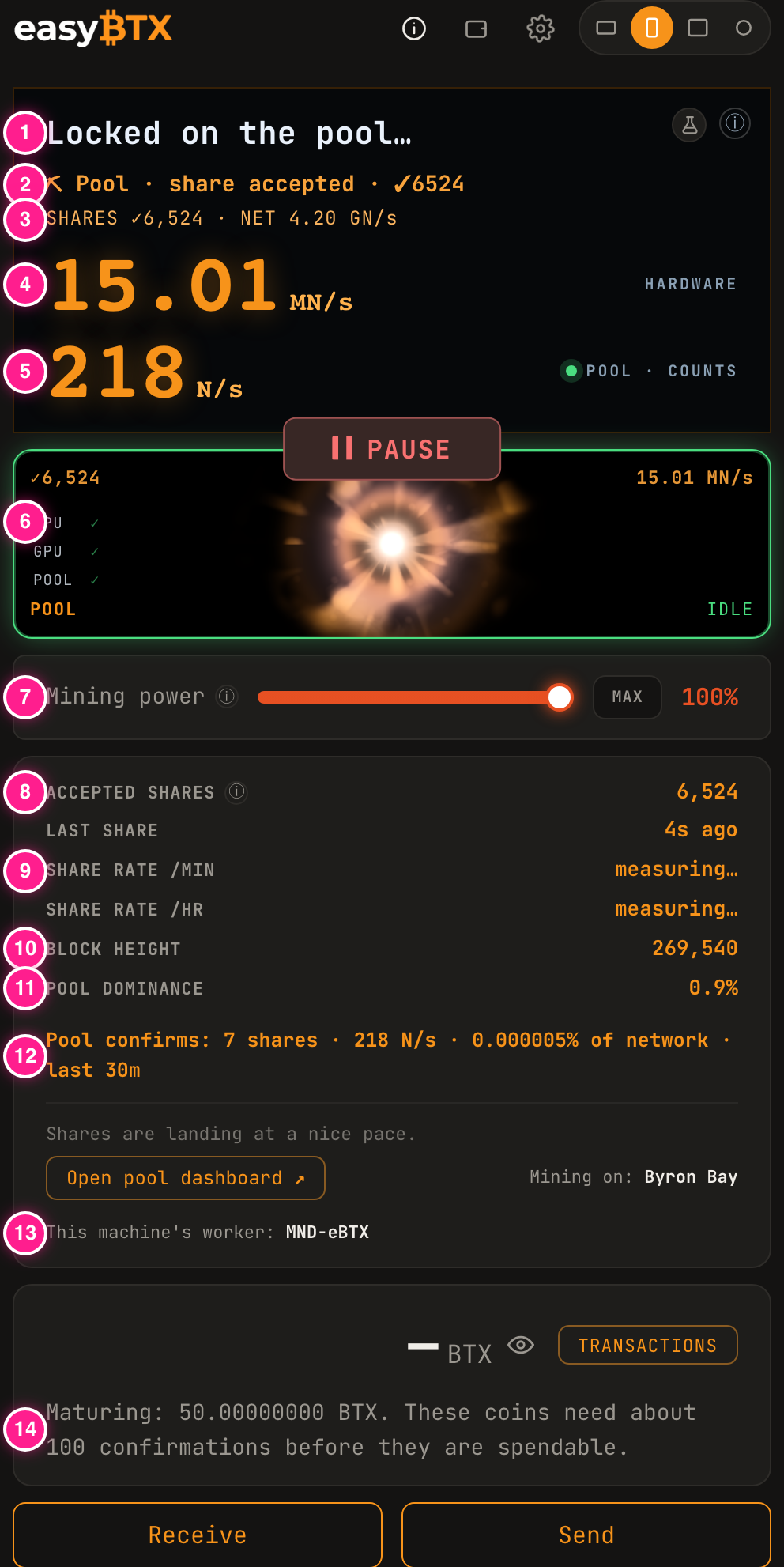
- Status headline. A short line that tells you what the app is doing right now. It cycles through phrases like "Locked on the pool" while everything is healthy.
- Live pool line. The last thing that happened between you and the pool. "Share accepted" followed by a checkmark and a count is the one you want to see.
- Ticker. Small rotating facts: your accepted shares, the whole network's rate, the current block.
- Hardware speed. What your machine is physically doing, measured by easyBTX itself. Explained below.
- Pool speed. What the pool credits you with, measured by the pool. Also explained below, because these two numbers confuse everyone at first.
- Engine check. Green ticks for CPU, GPU, and POOL mean every part of the pipeline is alive. IDLE just means the animation is resting between jobs, not that mining stopped.
- Mining power. A throttle. 100% uses your GPU fully; lower values tell the miner to rest part of each minute, which means less heat, less fan, and proportionally fewer results.
- Accepted shares. Your lifetime count of pool-approved work. This is the number that turns into payouts.
- Share rate. How often your shares are landing. It reads "measuring" until enough time has passed to say something honest, and "quiet now" during a normal lull. Since the fork, lulls are longer than they used to be. See "Shares are rare now" below.
- Block height. How long the BTX blockchain is right now. The target spacing is one new block every 90 seconds, and in practice the chain has run a little faster than that over its lifetime.
- Pool dominance. Your pool's slice of the whole network's mining effort.
- Pool confirms. The pool's own recent view of your machine: shares it counted, the rate it credits, and your slice of the network, over the last half hour.
- Worker. The name your machine mines under, so the pool's dashboard can tell your rigs apart.
- Maturing coins. Freshly mined BTX must wait about 100 blocks before it can be spent. Not gone, just settling.
What one attempt is now
One attempt at the BTX puzzle is called an episode, and a single episode takes real time: roughly 30 to 40 seconds on a fast machine, and longer on older hardware that still qualifies.
That sounds slow, and it is deliberate. An episode is one complete run of the network's inference workload, called ENC-RC. Your GPU takes the current job, pushes it through four rounds of a sixteen-layer pass over matrices 4,096 numbers wide, and checks whether what comes out the far end is good enough to win. If it is not, that episode is spent and the next one starts. There is no way to shortcut the middle of it, which is the point: the work has to be genuinely done.
So the readout counts episodes per minute, not attempts per second. Two measured reference points:
- A qualifying Apple Silicon Mac takes about 30 to 40 seconds per episode, and an older qualifying Mac takes longer.
- An NVIDIA RTX 3060 running the MATADOR engine measures about 11 episodes per minute, a little over 5 seconds each.
Those are small-looking numbers and they are correct. Everyone on the network is working in the same units, so a rate of a few episodes per minute is a normal, healthy machine, not a broken one.
How it used to work, before block 185,000
Until the MatMul v4.7 fork activated at block 185,000 on 10 August 2026, one attempt was one nonce, written N, and a nonce was cheap: a 512 by 512 matrix multiply that a GPU could repeat millions of times a second. So the app counted in N/s, KN/s (thousands), MN/s (millions), and GN/s (billions), and a Mac's main readout sat in MN/s.
That is history. The fork replaced that cheap guess with the heavy episode described above, so the rate went from millions of attempts per second to roughly one attempt every half minute, and the old units stopped describing anything real. easyBTX 0.21.1 changed the readout for exactly that reason: under the old arithmetic, a perfectly healthy Mac that was earning shares displayed a flat 0, because it was no longer completing even one million-attempt unit per second.
If you find a screenshot, a video, or a forum post quoting MN/s, it is from before the fork. Current builds do not show those units, and you should not expect to see them.
Why are there two speeds?
The main screen stacks two numbers, and both are correct. They measure the same work in two different ways.
HARDWARE is your machine's own rate, counted by easyBTX on the spot: episodes per minute that your GPU is actually finishing. It is a measure of effort.
POOL · COUNTS is what the pool credits you with, counted by the pool from the shares you send in. The pool cannot watch your GPU. It only sees the qualifying results you hand over, so it estimates your rate from how many arrive and how hard they were to find. It is a measure of credited results, and it is the number the pool's own dashboard shows for your worker.
The gap between them is normal and expected, and it got wider after the fork, because only a small fraction of episodes produce a share. Neither number is wrong: one counts effort, the other counts results. Payouts follow the pool number, and it bounces around a lot in the short term, so judge it by the day, not by the minute.
Shares are rare now
A share is a piece of proof that your machine really worked. Finding a whole block is extremely rare, so the pool sets an easier practice target. Every time one of your episodes beats that easier target, your miner submits it as a share, and the pool checks it.
Post-fork, shares arrive far less often than they used to, and this is the single most common thing people mistake for a fault. Rough measured shape on a Mac:
- While the pool still has you on its beginner difficulty, expect roughly one accepted share per 40 episodes.
- Once the pool has measured you and settled your difficulty where it belongs, expect roughly one accepted share per 212 episodes.
Both figures come from one run: a single Apple silicon Mac on Byron Bay, 20 to 22 August 2026. They are the only share rates we have ever measured, and we have not reproduced them since. Treat the numbers as that machine on that pool, not as a promise about yours.
At 30 to 40 seconds an episode, that second figure is a couple of hours between shares, and longer again on a slower machine. Nothing is broken. The pool raised your target because your machine earned it, so each share you do land counts for correspondingly more work.
Two words you will see on shares:
- Accepted means the pool verified it and wrote it on your tab. This is the only counter that matters for earnings.
- Rejected means the pool could not use it, usually because it arrived a moment too late for a block that had already moved on. A handful of rejects is nothing to worry about.
When enough shares from everyone in the pool add up to a found block, the reward is split in proportion to the shares each miner contributed. That is the whole business model of a pool: many small miners acting as one big one, trading the lottery jackpot for a steady drip.
Pool words
- Pool. A team of miners who combine their effort and share the rewards. easyBTX mines in a pool, always. There is no solo mode in the app today, on any platform. Running a full BTX node is a separate thing and a separate app, easyNode, and it is not solo mining.
- Worker. Your machine's name tag on the pool, like MND-eBTX. Rename it in Settings if you run several machines, so you can tell them apart on the pool dashboard.
- Pool dominance. The pool's share of the whole network. If a pool has 1% dominance, it finds about 1% of all blocks.
- Choosing a pool. easyBTX mines on BTX Pool (btx-pool.com, 1.5% fee) on every platform. You can still enter a custom pool in Settings, under Mining, with the same caution as always: many BTX pools speak a slightly different dialect, and a mismatched pool will happily accept your connection while counting nothing. If shares stay at zero after a switch, switch back.
- Choosing an engine. Linux and Windows only, from easyBTX 0.23.0, in Settings under Mining. MATADOR is the default and the faster of the two on every card we have measured, and it takes 1% of its own. BTX-RC takes no fee of its own, is self contained, and backs off politely when a pool stops answering, but on the one card we have measured, an RTX 3060, it is about 1.5 times slower than MATADOR. We have not tested it on 40 series or 50 series cards, where it may do better or worse. Pick the engine first, then arm it. Mac does not use either one and has no engine setting.
- Block height. The length of the chain, which also works as the network's clock. When the app shows the height climbing, your connection to the network is healthy.
- Network rate. The combined effort of every miner on the network. Your slice of it is what the "of network" percentage in the pool-confirms line means.
Fees, plainly
Three fees can apply, and the app states them up front.
- easyBTX takes a fixed 4.99% tool fee on mining time. It is pinned in the source and guarded by a test that fails the build if anyone changes it.
- Your pool takes its own fee on top. BTX Pool takes 1.5%. A custom pool you enter sets its own.
- Your mining engine, on Linux and Windows only, may take a fee of its own. MATADOR takes 1%. BTX-RC takes nothing. You choose which one runs, so this fee is the one you can remove. Mac does not use either engine and always pays two fees rather than three.
Payout schedules also differ per pool: some pay on a weekly clock, some pay each time a block is found. The app shows the terms for the pool you have selected.
Wallet words
- Balance. BTX that is fully yours and spendable now.
- Maturing. Freshly mined coins wait about 100 blocks (a few hours) before they unlock. Every miner's coins do this; it is a Bitcoin-family safety rule, not a hold on you.
- Pending. A transaction that is on its way but not yet buried under enough blocks to be final.
- Receive / Send. Your wallet lives on your machine and the keys are yours. The Receive screen shows your address (BTX addresses start with btx1z and are post-quantum secure); Send moves coins out. You can also set an external payout address so the pool pays a wallet you keep somewhere else. Back up your wallet once, keep the backup somewhere safe, and no lost laptop can take your coins with it.
- Explorer. Every transaction and address can be viewed publicly at btxscan.io, the BTX block explorer. The app links there whenever you tap a transaction.
If you only remember three things
Accepted shares are the number that pays. The two speeds measure effort and results, and both are telling the truth. And since the fork, a long quiet stretch between shares is the normal shape of mining, not a problem: the app will tell you if something actually needs attention.
Still curious about something the app shows? Ask in the easyBTX Telegram and we will add it to this page.
This page is the current version of the guide. The old PDF edition was written before the fork at block 185,000 and is no longer offered, because it describes the retired units as if they were live.